
4. G010-Receive Inventory Items
Overview
| Date: | March 13, 2015 |
|---|---|
| Author: | Corbin Fletcher |
| Document ID | Relase Date | Author | Version |
|---|---|---|---|
| G010- Receive Inventory Items | 19/1/2015 | Corbin Fletcher | v 1.0 |
New in version v1.0,: Content added 21/2/2015
4.1. Introduction
When merchandise arrives to our retail location each item must be received properly. During this process, you manually enter relevant data about each item received at our retail location. Initially, you are emailed a manifest, and then using the data contained in the manifest, you will enter data into our Quickbooks data base. This task is very important and you must be accurate when entering the data.
4.2. Scope
This task requires a team member to understand our daily operational process of documenting each sale as well as keeping track of petty cash. This SOP with provide the instruction need so any team member can follow the step by step instructions and complete the task.
4.3. Processes
- Log into Quickbooks;
- Go to Vendors => Receive Items;
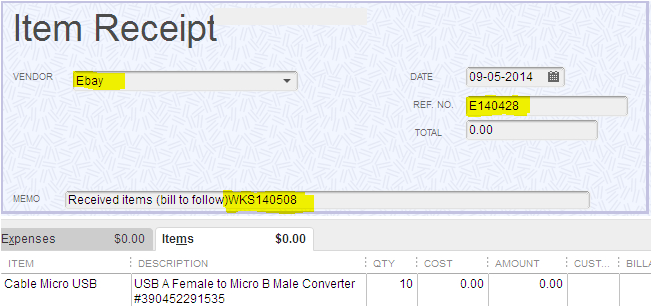
- Next, the Create Item Receipts window will open;
Note
Above is a detailed image of the Quickbooks Item Receipt window. Highlighted are the primary fields that need to be populated. Also, the image contains an example inventory item being received.
- You must Enter each item into the Quickbooks database using the purchasing work sheet data.
- After all the data has been entered, click on Report => Transaction Journal report;
- Next, from the main tool bar, click Excel => Create New Work Sheet, Save the report to your local computer as an Excel spread sheet;
- Then export the Excel file and save the report as PDF;
- Next, navigate to your email client (MS Outlook), locate your originally email containing the purchase order work sheet, open the email and click reply to all. Next, compose an email, and send the PDF copy of your Transaction Journal report as an attachment;
- Lastly, upload the PDF copy to SigerTronic System network share directory (P:Inventory Received).
4.4. Scope
Accurately enter received inventory items into our Qucikbooks database is an extremely crucial business process and it must be done correct. Anyone who is not experienced with this task should follow the processes articulated in this SOP. Additionally, this SOP will provide someone with all the information needed to complete this task.
4.5. Definitions
- The manifest:
- Provides item description and quantity of each item shipped to our retail location. The manifest is a breakdown of the cost for shipping and the cost of each item. Obtaining the manifest is an absolute requirement for completing this task.
- Transaction Journal report:
- Is created after you have manually entered all relevant data from the manifest into our Quickbooks database.
Tip
The shipping manifest is synonyms with purchase order work sheet.

Creative Commons Attribution-NonCommercial-ShareAlike 4.0 International License.